
Login With AJAX has a new name: AJAX Auth. It's the same plugin, made by the same people, and updating to 4.6 won't change how your login forms look or behave. What has changed is the name, the logo and our address, which is now ajaxauth.com.
Why the new name
AJAX was the buzzword of the day when Login With AJAX started in 2008, and it's a fairly antiquated term now (pretty much everything on the web loads without a page refresh these days). The new name keeps a nod to that legacy, but AJAX also doubles as Ajax, the warrior of Greek legend, which is where the helmet in our new logo comes from. "Auth" is short for authentication, which covers a lot more than just logging in, and the plugin now handles passkeys, two-factor authentication and (in Pro) login limits too. A new name was also a good excuse to rebuild the docs while we were at it.
Security fixes
4.6 also fixes an open redirect and two stored XSS vulnerabilities, so please update even if you don't mind what we're called.
If you use AJAX Auth Pro
Pro 2.1 and older look for license checks and updates at our previous address. Update the free plugin to 4.6 first, because it sends those requests to ajaxauth.com instead. Pro 2.2 will then show up in your updates as usual, and from 2.2 onwards Pro only accepts update packages from ajaxauth.com.
What's new
New shortcodes, and the old ones still work
There's a new [ajaxauth] shortcode, along with [ajaxauth_2FA_editor] and [ajaxauth_passkeys_editor]. Your existing [lwa] and [login-with-ajax] shortcodes keep working, so there's no need to edit any pages. The one difference is that a bare [ajaxauth] uses the Default Template from your settings, whereas the older shortcodes stick with the Default template so existing pages don't change.
Shortcode attributes that actually work
While rewriting the docs we found that eight of the documented shortcode attributes were being quietly ignored (apologies to anyone who spent time wondering why). title, title_loggedin, template_color, css_style, vanilla, loggedin_vertical, avatar_size and avatar_rounded all work now, so you can style a form right in the shortcode:
[ajaxauth template="minimalistic" title="Hi! Log Into Our Site!" template_color="#aa8fc7" registration="0"]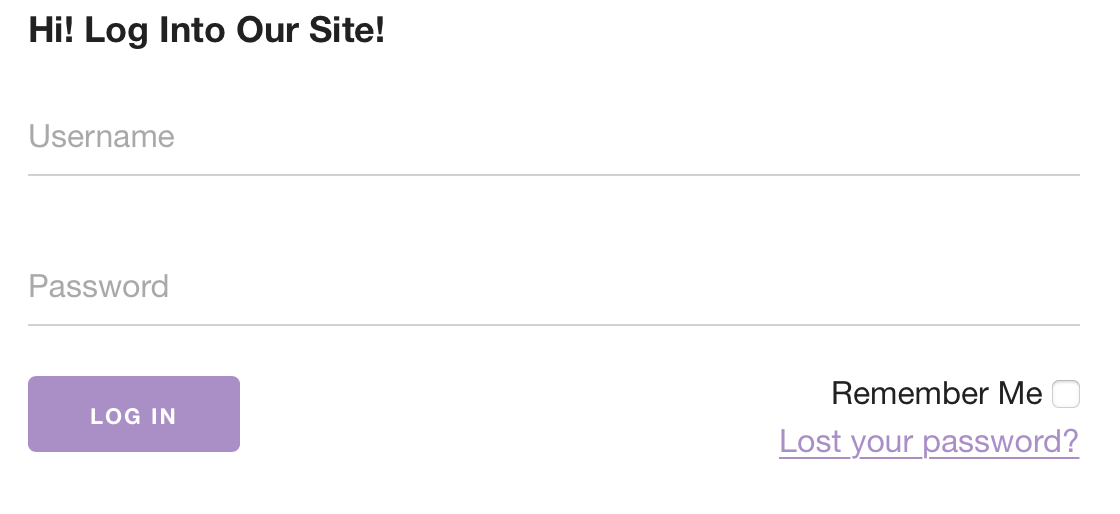
Logging in without a page refresh
The "Disable refresh upon login?" setting hadn't been doing its job for a while. It now swaps the login form for the logged-in widget without reloading the page, including after a 2FA step or a passkey login. You can also choose per form with refresh="1" or refresh="0".
Passkey tweaks
Passkeys now register on sites with a port in the URL (handy for local and staging sites), and the passkey prompt shows your site's name instead of "WebAuthn Library".
Unblocking locked-out users in Pro
If the Pro login limiter blocks someone, you no longer need to wait it out. There's an Unblock link for them in the Users list and an Unblock button on their profile.

New docs and a quick tour
The documentation has moved to docs.ajaxauth.com and has been rewritten for 4.6, with new screenshots and examples that use the new shortcodes. If you'd rather watch than read, there's also a short tour:
The full list of changes is in the changelog. If anything misbehaves after updating, let us know on the wordpress.org support forum (or our Pro forum if you're a Pro customer) and we'll look into it.